Color Block Journey: Puzzle Game
Reviews
Color Block Journey offers a calm yet engaging puzzle experience. The travel-themed backdrops add a pleasant visual touch, while the progressive difficulty keeps you thinking. It's easy to pick up for a few minutes or enjoy longer sessions. A great choice for anyone who enjoys brain-training games without stress.
About this game
Game Introduction
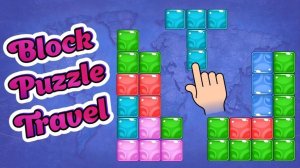
Color Block Journey is a casual puzzle game centered on clearing a board filled with colorful blocks. The core objective is to select and remove groups of two or more adjacent blocks of the same color. As blocks are cleared, new blocks fall into place, which can create chain reactions and combos. Each level presents a unique layout, requiring careful planning to achieve a perfect score. The game features travel-themed backdrops that provide a calm and engaging atmosphere. This combination of simple mechanics and thoughtful strategy makes it suitable for players of all ages looking to enhance their cognitive skills.
How to Play
To play Color Block Journey, players start by looking at the board filled with various colored blocks. They tap or click on a group of two or more adjacent blocks of the same color to make them disappear. Clearing blocks causes new blocks to fall from above, which can create additional matching groups. Players plan their moves to maximize the number of blocks cleared in a single action, as this earns bonus points. The goal is to clear the entire board or achieve a high score within each level. As players progress, levels become more complex, requiring thoughtful strategy to succeed.
Game Features
Color Block Journey offers engaging block-matching puzzles that challenge strategic thinking. The brain-training mechanics are designed to improve attention and logic. Family-friendly travel themes create a relaxing visual experience. Progressive level difficulty keeps gameplay fresh and rewarding. Simple controls make it suitable for quick play sessions or extended gameplay.
Tips for Success
To succeed in Color Block Journey, focus on planning several moves ahead. Look for opportunities to create chain reactions by clearing blocks that will cause new matches to form. Prioritize clearing larger groups of blocks to earn higher scores. Take your time to scan the entire board before making a move, as thoughtful planning often leads to better outcomes. Practice regularly to improve your pattern recognition and strategic thinking skills.