
Reviews
Collaborative Pixel Art Studio excels at lowering the barrier to creative expression. The infinite canvas encourages both small doodles and ambitious group projects, while the real-time chat adds a social dimension rarely seen in drawing tools. The interface is clean and responsive, making it easy to jump in without a tutorial. Its greatest strength is the sense of shared accomplishment when a large piece comes together through the efforts of many strangers. A genuinely positive and family-friendly environment.
Description
Shared Canvas, Infinite Possibilities
The foundation of this experience is a single, enormous canvas that any visitor can access. Unlike limited drawing boards, this space grows with the community, allowing for projects that span entire neighborhoods of pixels. Newcomers might start with a simple flower or character, while coordinated groups can map out and fill sections for large-scale artworks. The lack of a predetermined grid size means the only boundary is the collective imagination of those drawing.Toolkit for Digital Artists
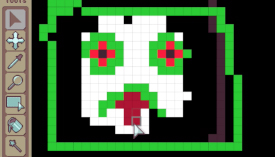
A straightforward palette on the side of the screen provides all the essentials. A brush for placing individual pixels, a fill option for covering larger areas quickly, and an eraser for corrections. Zoom controls let artists work on fine details or step back to see the bigger picture. Color selection is broad, giving everyone access to a wide spectrum without needing to mix or purchase shades.Real-Time Collaboration Features
Multiple users can edit the same coordinates at the same time, which is both a challenge and a delight. A built-in chat system allows players to discuss plans, coordinate color choices, or simply compliment each other's work. This social layer turns a solitary drawing activity into a shared creative event. The community generally follows simple guidelines to keep the space welcoming for all ages.Accessibility and Technical Requirements
No software installation is needed. The entire application runs in a standard web browser, making it available on nearly any device with an internet connection. This low barrier to entry means anyone can participate, whether they are using a desktop computer, laptop, or tablet. The interface is designed to be intuitive, so even those with no prior pixel art experience can start placing pixels within seconds.Community Culture and Etiquette
A positive atmosphere is encouraged through basic rules that discourage destructive behavior. Players are asked to respect the work of others and to avoid overwriting without permission. Many users find that the most rewarding moments come from spontaneous collaborations, where strangers work together to complete a section of the canvas. This sense of shared ownership is a key part of the appeal.✅ Compatibility & Testing
• Desktop (Windows 11, macOS Ventura)
• Mobile (iPhone 14, Samsung Galaxy S23)
• Tablet (iPad Pro, Android tablet)
✅Supported browsers: Chrome, Safari, Edge, Firefox (latest versions)
❌ Not supported: Internet Explorer, older browser versions





Player Comments
Sign in to comment
You must be logged in before posting a review or rating.
No account? Create one
No comments yet. Be the first to comment!