
Reviews
Description
Digital Dye Studio
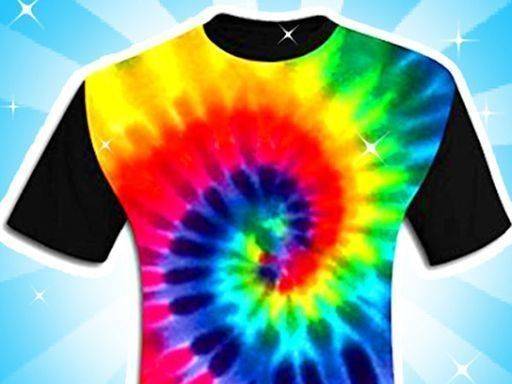
This application brings the traditional craft of fabric dyeing into a virtual environment, removing the need for physical supplies or cleanup. Players start by selecting a garment such as a shirt or pants from a digital wardrobe. The interface guides users through folding the fabric in different ways, which directly influences how colors spread during the dye process. Instead of liquid dyes, the game uses a simulated ice-dye method where colored ice cubes are placed on the folded cloth. As the ice melts in the simulation, pigments bleed into the fabric, creating soft gradients and marbled effects. The entire process is presented in a clean, three-dimensional space that makes each step easy to see and control.
Color Blending Mechanics
The core mechanic revolves around how colors interact when placed close together. Players can select from a broad palette of safe, vibrant hues and arrange ice cubes in patterns or clusters. The melting simulation causes colors to mix along edges, producing new shades and organic transitions. Experimenting with color placement is key to achieving different results. For instance, placing complementary colors side by side yields distinct blends, while layering similar tones creates subtle depth. The system rewards curiosity, as small changes in cube arrangement can lead to dramatically different final designs. This encourages repeated play without the frustration of messy real-world materials.
Garment Selection and Folding
Before dyeing begins, players choose from several clothing items, each offering a different canvas shape. The folding step is critical, as the way fabric is folded determines where colors pool and how patterns emerge. Simple folds produce symmetrical designs, while more complex folds create abstract, asymmetric results. The game provides visual feedback during folding, showing how the garment will look when unfolded. This allows players to plan their approach before committing to a dye layout. The variety of folding options ensures that no two sessions feel identical, giving users a reason to return and try new configurations.
Saving and Sharing Creations
Once a design is complete, players can process it to reveal the final pattern. A virtual gallery stores all finished pieces, allowing users to browse their collection over time. This gallery serves as a personal portfolio, showing artistic growth and inspiring future projects. Designs can also be shared with friends and family through in-game options, fostering a community of creativity. The ability to revisit and compare past work adds a layer of reflection, helping players identify techniques that work best for them. The sharing feature is designed to be positive and encouraging, focusing on the joy of making rather than competition.
Family-Friendly Creative Space
The entire experience is built around accessibility and relaxation. There are no timers, scores, or failure conditions. Players can take as long as they like on each design, undoing steps if needed. The visual style is bright and cheerful, with soft animations that make the dye process satisfying to watch. Sound effects are gentle and non-intrusive, contributing to a calm atmosphere. This makes the game suitable for all ages, from young children exploring color for the first time to adults seeking a low-stress creative outlet. The focus remains on personal expression and the pleasure of seeing an idea come to life.



Player Comments
Sign in to comment
You must be logged in before posting a review or rating.
No account? Create one
No comments yet. Be the first to comment!